About Intellectual Property IP Training IP Outreach IP for… IP and... IP in... Patent & Technology Information Trademark Information Industrial Design Information Geographical Indication Information Plant Variety Information (UPOV) IP Laws, Treaties & Judgements IP Resources IP Reports Patent Protection Trademark Protection Industrial Design Protection Geographical Indication Protection Plant Variety Protection (UPOV) IP Dispute Resolution IP Office Business Solutions Paying for IP Services Negotiation & Decision-Making Development Cooperation Innovation Support Public-Private Partnerships The Organization Working with WIPO Accountability Patents Trademarks Industrial Designs Geographical Indications Copyright Trade Secrets WIPO Academy Workshops & Seminars World IP Day WIPO Magazine Raising Awareness Case Studies & Success Stories IP News WIPO Awards Business Universities Indigenous Peoples Judiciaries Genetic Resources, Traditional Knowledge and Traditional Cultural Expressions Economics Gender Equality Global Health Climate Change Competition Policy Sustainable Development Goals Enforcement Frontier Technologies Mobile Applications Sports Tourism PATENTSCOPE Patent Analytics International Patent Classification ARDI – Research for Innovation ASPI – Specialized Patent Information Global Brand Database Madrid Monitor Article 6ter Express Database Nice Classification Vienna Classification Global Design Database International Designs Bulletin Hague Express Database Locarno Classification Lisbon Express Database Global Brand Database for GIs PLUTO Plant Variety Database GENIE Database WIPO-Administered Treaties WIPO Lex - IP Laws, Treaties & Judgments WIPO Standards IP Statistics WIPO Pearl (Terminology) WIPO Publications Country IP Profiles WIPO Knowledge Center WIPO Technology Trends Global Innovation Index World Intellectual Property Report PCT – The International Patent System ePCT Budapest – The International Microorganism Deposit System Madrid – The International Trademark System eMadrid Article 6ter (armorial bearings, flags, state emblems) Hague – The International Design System eHague Lisbon – The International System of Appellations of Origin and Geographical Indications eLisbon UPOV PRISMA Mediation Arbitration Expert Determination Domain Name Disputes Centralized Access to Search and Examination (CASE) Digital Access Service (DAS) WIPO Pay Current Account at WIPO WIPO Assemblies Standing Committees Calendar of Meetings WIPO Official Documents Development Agenda Technical Assistance IP Training Institutions COVID-19 Support National IP Strategies Policy & Legislative Advice Cooperation Hub Technology and Innovation Support Centers (TISC) Technology Transfer Inventor Assistance Program WIPO GREEN WIPO's Pat-INFORMED Accessible Books Consortium WIPO for Creators WIPO ALERT Member States Observers Director General Activities by Unit External Offices Job Vacancies Procurement Results & Budget Financial Reporting Oversight

How to enroll for your certificate

These instructions have been prepared for Internet Explorer 11.0. The screenshots and other details may differ if you use another version of the browser. 

If you are an ePCT user, please enroll for your WIPO Customer CA digital certificate via the ePCT portal and refer to "How to request a WIPO Digital Certificate in ePCT"; otherwise click here for the enrollment link page and follow the instructions below.

ePCT users are also reminded that there are other strong authentication methods as efficient alternatives to WIPO digital certificates: one-time password generated either by a standard app (such as Google Authenticator), or sent by text message (SMS) to your mobile phone.

IMPORTANT: The certificate enrollment and pick-up/retrieval can only be done using the same internet browser, either Internet Explorer or Mozilla Firefox. Other internet browsers, such as Edge, Google Chrome, Safari etc... are not compatible.

1. Fill in the enrollment form with your first name and last name spelled in full and in Latin characters, enter your email address, click Continue to submit your request. A comment can be added if required, preferably in English. 

IMPORTANT: WIPO digital certificates may only be issued to individuals, not in the name of companies. Individuals working for companies are invited to enroll for certificates using their own names.

Enroll G4

2. A confirmation message is displayed to confirm that your request was successfully submitted. Take note of the Certificate enrollment code which might be required at the time of pick-up/retrieval.

You may contact PCT eServices pct.eservices@wipo.int if you lost the enrollment code.
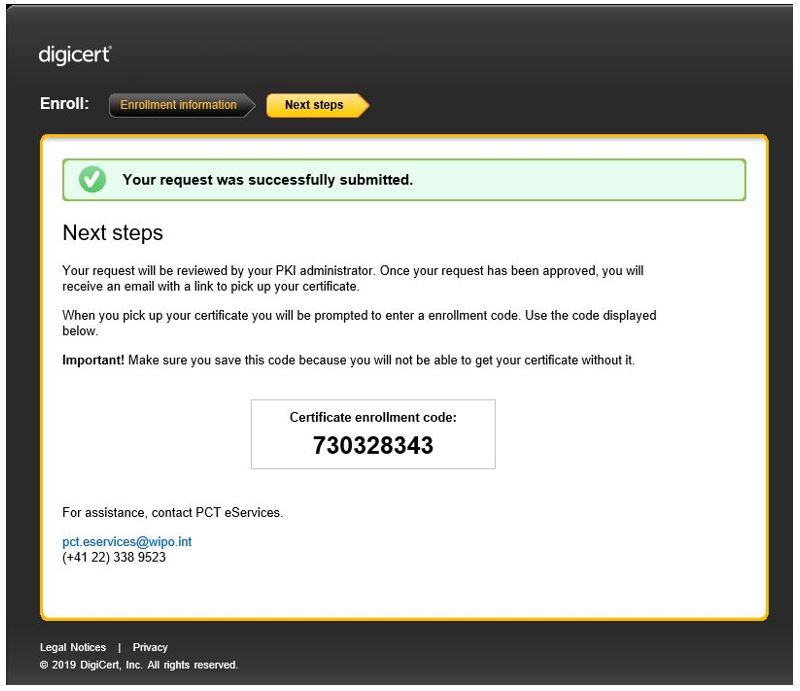
enrollment code

3. The enrollment process is now complete. The WIPO Customer Certification Authority aims to approve certificate requests within one WIPO working day.

Once your request is approved, you will receive an e-mail notification containing a link in order to pick up/retrieve your certificate. It is recommended to copy and paste the link into the Internet Explorer or Mozilla Firefox browser which you used for the enrollment. If you click on the link your default browser will open and it may be a different internet browser.


Next: How to pick up your certificate and save a copy of it